Showing posts with label samsung Galaxy. Show all posts

Samsung Galaxy Note 8.0 tablet 2013 Mode review about

3:19:00 PM

Samsung Galaxy Note 8.0 tablet  2013 Mode review about


First off, to save yourself some time, if you have no intentions of using the stylus for taking notes or modifying photos then stop reading this right now. The stylus IS the reason this tablet costs more than the competition and in my opinion it's worth the price. Yes, there are more powerful tablets out there that are much cheaper but they don't have a stylus! This tablet is designed for the person who likes to read/write and/or do artwork/photo-shopping. If you don't need a stylus then you don't need to read this review (look at other products like the Nexus 7).

The Pros: 


Taking notes on this device is a dream (very precise, even for mathematicians)
-The hand-writing recognition feature is pretty darn accurate
-I can use Microsoft OneNote to take notes (yay!) See "comments" section for more info on this(page 2)
-Supports a 64GB micro-SD card (search Amazon for the Samsung card)
-The interface is snappy and the graphics are fluid (for the most part)
-Internet browsing and switching between programs is quick and smooth
-The device is easy to hold and is very lightweight
-The image quality is crisp, clear and bright
-Did I mention, I really love the pen and it's ability to glide across the screen effortlessly?
-The infrared remote feature is pretty slick and worked with my Panasonic T.V. without issue
-Comes with 50GB dropbox account (for storing and sharing files with others)
-Includes a $25 Google Play credit for downloading apps
-Very quick to charge (roughly 2 hours)
-Plastic finish is very slick and clean - Metal bends and scratches so pick your poison

The Cons:


-The price should be lowered by about $50 in my opinion because of the weak video card (see below)
-The device comes with Android 4.1.x and not 4.2.x (Samsung hasn't announced when they will release the "much improved" update)

The graphics card is kind of weak for playing graphic intensive games but this tablet isn't really meant for that. For example, I played "Real Racing 3" and my framerate was probably 20-30 FPS. Still playable but kind of choppy. Additionally, when I unlock the screen with the stylus, the "ink" effect can be sluggish at times with a noticeable frame rate drop. Maybe an update will fix this.

Overall: I bought this device to take notes and it does that VERY well. I can write complex math formulas and draw nearly anything I can think of without pixelation issues or accuracy problems. The stylus IS the reason to buy this tablet. Don't go off of the specs or other reviewers who have emotional feelings toward this device. If you're serious about taking notes (college students and corporate employees), reading e-books and playing the occasional YouTube videos and browsing the internet, you found your golden nugget. I did A LOT of research to find a replacement for my convertible-laptop (stylus enabled laptop) and I believe the Galaxy Note 8 was the right choice.

After thoughts: For what it's worth, you can go to Best Buy and purchase the tablet. If you think it's not right for you, you have 15 days to return it and get a 100% refund. If you're a "Silver" status member at Best Buy, you get 60 days to try it out. After using it for just one day, I'm sold on the device and plan on keeping it. Your mileage might very. But I believe the portability and the note taking features of this device far out-way the cons. Other reviewers compare this tablet to other tablets that don't even have a stylus. That's just not fair. That's like me comparing a wheel-chair (which has a specific purpose) to a bicycle (which has a different purpose). Yes, both will get you around but they are designed for specific needs and I personally feel that the Note 8 will satisfy those looking for a stylus enabled tablet at an affordable price.

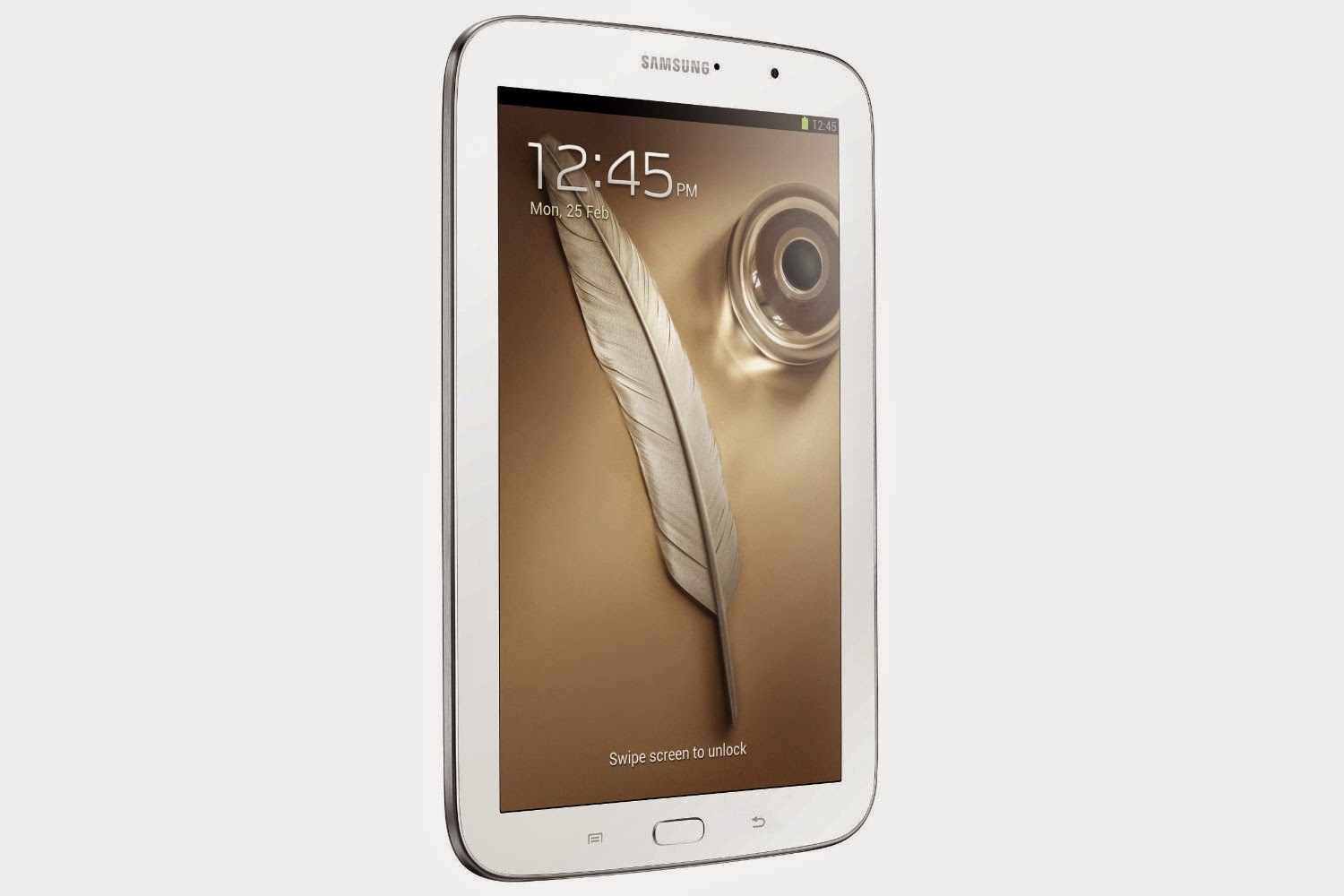
Samsung Galaxy Note 8.0 tablet  2013 Mode review about

Samsung Galaxy Note 8.0 tablet  2013 Mode review about


Samsung Galaxy Note 8.0 tablet  2013 Mode photos

Samsung Galaxy Tab Pro 8.4-Inch Tablet full review

6:40:00 AM

Samsung Galaxy Tab Pro 8.4-Inch Tablet full review


fiest thing is the CASE
The Galaxy Tab Pro 8.4 is ten percent taller, four percent narrower, and maybe a smidge thinner than the Apple mini-iPad Retina. The two are almost exactly the same weight. The Tab Pro 8.4 has a pleasing simulated-leather back, which is very realistic in look and feel, including stitching. The mini-iPad retina has a metal back.

O/S, RAM & STORAGE
The Tab Pro 8.4 runs on Android 4.4.2 (Kit Kat) which is the latest released version of Android -- seems to be a very stable and a well executed O/S. I have yet to run into anything funny or alarming with it. One thing I like very much about Kit Kat is that the O/S manages your memory for you -- you no longer have to worry about where things go. And it has a massive memory/storage capability -- 2 GB RAM, plus 16 GB of fast internal storage, plus up to 64 GB external micoSDXC storage, for a whopping 80 GB of very fast combined on-board storage capability.

In comparison, the Apple min-iPad Retina does not have a user-accessible external storage, so once you purchase your mini-iPad, you can't add more storage later. Apple does offer sub-models with more internal storage, but at a greatly increased price, for example at 64GB, nearly $600. Compare that to an 80GB Tab Pro 8.4 at $400 ($350 for the 16 GB Tab Pro + $50 for the 64GB microSDXC card.).


CONNECTIVITY
-- WiFi & Bluetooth
The Tab Pro 8.4 has the latest versions of Bluetooth (version 4.0), and WiFi (802.11 a/b/g/n/ac),.

-- Infra Red Blaster
Infra Red Blaster provides an all-device remote control.

-- HDMI
The tab Pro 8.4 does NOT have a dedicated HDMI port, though it does support a USB to HDMI adapter, which you can purchase at many outlets, including Amazon.com.

-- WiFi Direct
WiFi Direct allows you to connect wirelessly with multiple devices (that also have WiFi Direct capability) and share information and files. WiFi Direct may not be immediately useful to you, but it is a feature you would probably want in all your future devices.

-- USB to PC
Normally, when you connect a handheld device to a PC by USB cable, the device becomes just an external storage device to your PC (or Mac), and no other features of the device can be used while so connected. If you do this on the Tab Pro 8.4, you will see two new storage devices on your PC: "Card" and "Tablet." "Tablet" is the internal storage (16 GB) that comes with the device - don't mess with it. "Card" is the external microSD card that you can install, and add files to from your PC. If you go about changing folder and file names you didn't add, you can screw up your device. When you are connected to a PC by USB, the Tab Pro 8.4's battery will not be charged. So you should have the Tab Pro 8.4 fully charged before attaching it to a PC by USB cable.

-- Kies
Samsung Kies is software to install on your PC or Mac which enables you to connect safely using a USB cable to update firmware, synchronize files, and transfer data much faster that Bluetooth. You can also synch with your PC's Windows Media Player (but forget synching with Apple iTunes - Apple just won't cooperate with Samsung or Google in any way.)

You download Kies to your PC from Samsung's website. There may be more than one version -- You use the latest version For the Tab Pro 8.4. After you install Kies, it will ask you to download a Samsung Kies USB driver that will increase the speed of the connection.

When you use Samsung's Kies software to connect your PC by USB cable to the Tab Pro 8.4, you won't see the Internal and external storage drives. Kies will perform firmware upgrades, and while doing so, you can't use the device for anything else. However, if you are just transmitting folder and file, or synching, you can simultaneously use the Tab Pro 8.4 features and apps. Using Kies makes transfers safe, and it knows where to put your music, pictures, and videos. For those files and folders, Kies will give you a choice whether to store on the internal storage or external microSD card.


PROCESSOR
A Snapdragon 800 2.3 GHz Quad-Core Processor (with 2GB RAM), and on-board GPU powers the Tab Pro 8.4, which is the most advanced and fastest processor used in Android devices.

The mini-iPad, by contrast, uses a Apple A7 CPU, which is no slouch, but only 1 GB of RAM on board. In throughput test comparisons, the edge goes to the Tab Pro 8.4.

DISPLAY
The Tab Pro 8.4 has a 5% larger screen area than the min-iPad Retina.

The Tab Pro 8.4's also has a higher pixel density -- display resolution is WQXGA (2560 x 1600 pixels) at 359 pixels per inch. That is better than Apple's retina display (2048 x 1536 pixels) at 326 pixels per inch.

The aspect ratio of the Tab Pro 8.4's screen is 16:10, which is the same as my computer monitor - so everything I see on my PC screen can be shown in even higher resolution on the Tab Pro 8.4.

A 16:10 aspect ratio is nearly the same as the HDTV aspect ratio of 16:9. Contrast that to mini-iPad's aspect ratio of 4:3, which causes HDTV content to either be truncated on the sides, or the HDTV image to be very small on the screen.

Samsung's default screen settings are a little too dim for my tastes. The Tab Pro 8.4 really shines with blazing, vivid colors at slightly higher brightness levels. The downside to increasing the brightness level is that the screen (which is the primary culprit in battery usage) depletes the battery faster.

White is the color with the highest battery drain (white requires all color pixels to be on). So the use of white backgrounds should be eliminated or minimized. I created a wallpaper that is just a totally black rectangle (stored as a .jpg file). The black wallpaper allows images on the screen to stand out better, even at reduced brightness levels. I also set my Kindle app to "white type on black background" for the same effect. Finally, I created a lock-screen which has my logo on it on a black background.

Clearly, the Tab Pro 8.4 is positioned to compete aggressively (both feature and price wise) with the Apple Retina mini-iPad. Excellent, very sharp images on the display (depending on the resolution of the image itself). This is the type of display that you only want high-definition images on.

MULTI-TASKING / MULTI-VIEWING

All Android devices can multi-task, but you can normally only view one screen at a time for any running app. The Tab Pro 8.4 allows up to four multi-tasking apps to be displayed simultaneously, and you can pair any two so they always show up together. This is a great feature for comparing two documents side by side, organizing files into different folders, or displaying a graphic in a separate window while browsing a document. It is a big step that brings much of the power of the PC display to the Android Tablet.

BATTERY
Here the edge clearly goes to the mini-iPad Retina with a 6,470 mAh battery to the Tab Pro 8.4's 4,800 mAh battery. That translates to roughly 10+ hours for the mini-iPad Retina versus 8 hours for the Tab Pro 8.4. Of course, user time will vary greatly - depending on screen brightness, sound volume, and the number of apps open. If you need more time between charges, consider purchasing a mobile battery extender, and/or invest in a car charger.

BATTERY CHARGER (wall mount)
The supplied Samsung USB Battery charger is rated at 2 amps, which is designed to rapidly recharge the device. Don't use any battery charger with less than a 2-amp capacity (which would include most cell phone charges) - they won't charge rapidly, if at all.

The same goes for the included Samsung USB cable - it is designed to handle a 2-amp load on recharging. Other USB cables may not be able to handle a 2-amp current..

CAMERA
Two Cameras -- 8MP Rear + 2MP Front. That is better than the mini-iPad Retina's cameras (5MP rear + 1.2MP front.) Not the highest resolution for professional photographers, but very good for the price range, and excellent for the amateur. The higher camera resolution allows a wider utility for the digital zoom without undue pixalation. And the Tab Pro 8.4's rear camera has flash, which the mini-iPad Retina doesn't. Both have auto-focus. Neither have an optical zoom.

GPS
The Tab Pro 8.4 has a fully functional on-board GPS. And it is fully compatible with Google Maps and Google Earth. The Apple mini-iPad Retina does not have GPS.

SOUND
The Tab Pro 8.4 has stereo speakers on the bottom (same as the min-iPad Retina.) Surprisingly good sound comes out these tiny speakers - no deep bass, but good enough to listen to movies and music without earphones. Put on some HiFi earphones for the best sound, or plug into some quality big speakers with a woofer for that big bass component.

MUSIC PLAYER

At first glance, the included Samsung music player (simply labled "Music") appears to be just a plain, simple, featureless music player. But it is actually a very understated, but feature rich, player. I mention it here because it would be all too easy to prematurely dismiss it.

You access the features from the Music screen by tapping on the small "Options" icon (three vertical dots) in the upper right corner of the screen, and then tap "Settings," and then "Player." It would have been better (and much more noticeable and convenient) to have these in tabbed folders directly from the player screen, but it is what it is.

The options under "Settings > Player" are:

- - Sound Alive
This is a multi-feature that has "Basic" and "Advanced" tabs.

Under the "Basic" tab is a graphic square layout that allows you to choose a setting between "Instrument" and "Vocal" (Karaoke effect) in five levels on the horizontal; scale, and simultaneously a setting between "Treble" and Bass" in five levels on the vertical scale. Some of the setting possibilities are labeled, such as: Classic, Normal, Pop, Rock, and Jazz.

Under the "Advanced" tab is a seven-band equalizer, and three special effects choices for "3D," "Bass," and "Clarity."

Available under either "Basic" or "Advanced" is a "Tube Amp Effect" that puts a little reverb in the sound. The "Tube Amp Effect" is only available with the earphones plugged in.

-- Adapt Sound
It is either on or off. I'm not sure what it does, but it only works with the earphones plugged in.

- - Play Speed
You can slow the music down, or speed it up -- by quite a bit - using a bar scale.

- - Music Auto Off.
Turns the Music player off after a time interval you choose.

- - Lyrics
Provides song lyrics. It is an on/off switch, and I presume you have to be subscribed to Google Music, or some lyrics service, to use it.

- - Smart Volume
It is an on/off switch that adjusts the sound level of all music tracks to level 13.


- - SAMSUNG
The included Samsung apps for the Tab Pro 8.4 are in a folder named "Samsung" while the Samsung App Store icon is now named "Galaxy Apps." That is a little confusing, so I thought I would mention it, because the "Samsung" folder icon looks just like an app icon rather than a folder. When you tap on the "Samsung" icon, a window opens up with the included apps displayed (Alarm, Calculator, Downloads, Help, KNOX, S Voice, Side Sync, World Clock.)

- - KNOX
Think of Knox as in Fort Knox - a place of high security. Knox is the secure (encrypted) part of your Tab Pro 8.4 - password protected. When you tap on the Knox icon, it prompts you to create a password and creates a secure folder for all your Knox-secured applications and files. It then opens a table of secure (KNOX) versions of applications, some of which are free, and some you might have to pay for.

In addition to the included apps, Samsung includes a $25 voucher for your choice of apps to purchase (from the Samsung App Store, not Google Play.) Some very powerful business apps in the Samsung store may be free, such as the Hancom Office set (HOffice, Hword, Hcell, Hshow, etc.) which will give you all the power to read, modify, and create Microsoft Office compatible documents.

INTERNET BROWSERS

Two internet browsers are included. Both are mobile versions, and both will look for a mobile version of the website you are visiting, but both will also provide full internet browsing.

- - Google Chrome Mobile, just labeled "Chrome," will synch itself with your Google account (if you are signed in.) And if you have tabs pinned on your PC version of Chrome, they will also be pinned in the mobile version. What you won't get with the mobile version are the apps and extensions that your PC version of Chrome can have. But word is out that Google is working on adding the apps and extensions to the mobile version, with a target release of late 2014. Chrome will allow you to zoom in and out on the web page.

- - Samsung mobile browser, just labeled "Internet," has a different tactic - you set the "small" print at the level most easily read by your eyes, and the content is sized accordingly. You can still zoom in and out on the web page. I had my doubts about this small print-setting tactic, but after using it, I rather like it.

CONCLUSION
It may be debatable exactly what the best hand-held thing on the market is now, but the Samsung Galaxy Tab Pro 8.4 is right up there at the top - feature wise, and price-point.

RECOMMENDATION

I, as a rational engineer, would pick the clearly superior Samsung Tab Pro 8.4 over the Apple Mini-iPad Retina. I bought one for myself. And my wife said she was going to upgrade to the Tab Pro 8.4 and abandon her Apple mini-iPad.


 Samsung Galaxy Tab Pro 8.4-Inch Tablet full photos


Contixo Q102 10.1" Quad Core Google Android Tablet review

10:24:00 AM

Contixo Q102 10.1" Quad Core Google Android  Tablet review


I chose Contixo Q102 tablet because I wanted a a cheap tablet with a 10" screen, and at least the resolution of my Samsung Galaxy Tab 3 7.0, which was straining my eyes, and it is much easier on my eyes than the Samsung when reading news or checking Facebook. I wanted at least 1GB of RAM, and a minimum of 8 GB storage, and I got double the storage I wanted. I also needed Bluetooth, because I anticipated that this tablet's speakers wouldn't bring out the audiophile in me, and I would rather use my high quality portable Bluetooth stereo speakers. After I received it, I ran the updates, verified all features worked as described. I loaded up 20GB worth of cartoons, added some games and other apps. Real Racing plays very well, although it is a bit slow to load. Also, after you first get this tablet, you have to let it operate and run its updates, and until it finishes doing that, it is going to be slow. Overall I got an excellent value for the money I paid compared to what I really want, which is a Samsung Galaxy Tab S 10, which is not in my budget.

I got a case* from the seller Fintie under the search listing of "Fintie Premium PU Leather Case Cover for 10.1'' Android Tablet." The case I chose has no keyboard. It fits perfectly with openings in all of the right places ;-) and functions as a stand. It's vegetarian leather too. *(sold seperately)

I am going to cover pros and cons, and I may mention competing products. For me, competing products are sub ~$100 tablets imported from China, with no recognizable name brands, and with much lower quality builds than a Samsung Galaxy tablet.

Pros:
Mine works
1024*600 screen resolution compared to most competing tablets having 800*480 resolution
1GB RAM compared to most competing have 512MB RAM
16GB storage compared to others only having 4GB or 8GB storage.
Does not have mechanical button on the front of it which means whichever way you orient it, your home button will be in the right place
Android Kit Kat compared to most others being on Jelly Bean or even Ice Cream Sandwich
Bluetooth on this and most others don't
Cameras are not the high end but are better than most competitors
Battery life is adequate for my needs at this price point
Great tablet for a kid who hasn't proven reliable enough taking care of expensive belongings
Great tablet for a person on a slim budget who can forego the TouchWiz interface of Samsung tablets

Cons:
Product not labeled for FCC compliance in the US
No brand name, model number, or serial number on it
No warnings for battery safety and recycling
Not labeled for where it was made
Screen is very cheap plastic and I am very afraid I will scratch it easily
Case is very cheap plastic
Charging connector is not a micro USB connector, so you can't use those interchangeable ones you've come to love
Micro USB host and micro USB jack both feel super cheap - be careful you don't break them by plugging them in upside down
Exterior build quality is comparable to lowest price electronics sold at Kmart or Big Lots


Contixo Q102

Contixo Q102

Contixo Q102

Contixo Q102


Samsung Galaxy Tab 3 review 2014

2:09:00 PM

Samsung Galaxy Tab 3 tablet review 2014


Samsung Galaxy Tab 3

7.0" 16M-color LCD capacitive touchscreen of 1024x600 pixel resolution; 170 ppi
Android OS v4.2.2 with TouchWiz
1.2 GHz dual-core Cortex-A9 CPU, GC1000 GPU, 1GB of RAM, Marvell PXA986 chipset
2 MP autofocus rear facing camera with face detection
VGA video recording at 24fps
8 GB internal storage, microSD slot max. 32GB
3G version with voice communication and SMS available - NOT included in this model
Wi-Fi 802.11 b/g/n support
GPS with A-GPS connectivity; GLONASS support
Stereo Bluetooth v4.0
microUSB port for charging, USB charging cable, wall adapter
Accelerometer sensor
Standard 3.5 mm audio jack
Document editor and file manager comes preinstalled
3600 mAh battery

Samsung Galaxy Tab 3 Main disadvantages:


No USB OTG support - No HDMI port
Low screen resolution-1024x600
Feeble chipset-only 1GB RAM
Only one speaker and placed at the back
No front-facing camera

If you're looking for a compact and inexpensive tablet - one you wouldn't worry about getting lost or damaged - this is as good a choice as any. This tablet is a stripped down version of the Samsung Galaxy Tab 3. Want to use SKYPE? Sorry, no front facing camera. Want to attach a USB stick, mouse or keyboard? Sorry, no USB OTG support. The tablet is extremely basic, primarily for tasks like reading and sending email, reading a book or magazine, watching Netflix or streaming music. The tablet works ok for what it is and I get about 6-9 hours out of the battery before recharge depending upon how I am using it.
The tablet will work well as a travel tablet, or one for the kids to use. Just don't expect too much of it.

Competition:

The ASUS MeMo Pad HD7 costs the same as the Samsung tablet but has better screen resolution, faster quad-core processor, front camera, higher-res rear camera and is lighter.
The Lenovo IdeaTab A3000 matches the Lite in all aspects: display size and resolution, Android version, battery but adds a front camera, better rear camera, USB OTG and a more powerful processor at the expense of a little extra thickness and weight.

Again, not a bad tablet for the price, but there are other tablets available with better specs for the same money. If this tablet were priced between $100 and $120, it would be a good deal. At $150+, it's just too expensive for what you get.


[GALAXY Tab] Official Live Demo - HD


Samsung Galaxy Tab 3 photos

 
Samsung Galaxy Tab 3

Samsung Galaxy Tab 3

Samsung Galaxy Tab 3


Samsung Galaxy Tab S 10.5-Inch Tablet review and all thing about

10:40:00 AM

Samsung Galaxy Tab S 10.5-Inch Tablet  2014  review and all thing about 


Samsung recently released the 
Samsung Galaxy Tab S 10.5, its newest flagship tablet. The device's closest competitor is the iPad Air -- which is a tablet I love. Besides Apple's tablet, there is really no other product to consider at the $500 price point. So, if you are considering a $500 general-use tablet, the only question that must be asked is -- is it better than the iPad Air?

Boy, what a tough question to answer -- tough, but not impossible. I've been using them both, side by side, for some time now and I have some definitive thoughts.

Galaxy Tab S 10.5 Specs

Network -- Wi-Fi Only
Processor -- Exynos 5 Octa (1.9 GHz QuadCore + 1.3 GHz QuadCore)
Display -- 10.5-inch WQXGA (2560x1600) Super AMOLED, 287ppi
OS -- Android 4.4 (KitKat)
Camera -- Rear: 8.0 Megapixel Auto Focus Camera with LED Flash, Front: 2.1 Megapixel
Connectivity -- Dual-Band Wi-Fi 802.11 a/b/g/n/ac MIMO, BT v4.0, USB 2.0
Memory 3GB RAM, 16GB Internal Memory, microSD (Up to 128GB)
Battery -- Li-ion 7,900mAh (10.5)

Samsung Galaxy Tab S 10.5-Inch Tablet 2014 review and all thing about 


Analysis

The first thing you notice upon taking the Tab S from the box is just how thin and light it is. Shockingly, at 6.6mm and 465 grams, it is even thinner and lighter than the iPad Air. This makes it very easy to hold and reduces arm-fatigue. Of course, at this point, we are splitting hairs -- both tablets are really thin and light.

If you are in the market for a 10 inch tablet, the screen should be a huge factor in your decision. For a while, the iPad Air display was one of the best, if not the best. The retina display, while partly marketing-speak, produced beautiful and vivid images. While the display on Apple's tablet is still great, it can no longer be called the best.

The Galaxy Tab S 10.5 offers a 2560 x 1600 resolution, but that is only part of the allure. The real news is the Super AMOLED technology, that recreates the most beautiful colors and imagery. Some may argue that this technology over-saturates the colors -- I must disagree. True, colors are more vivid, but not to the point of creating a mockery by any means. No, it instead treats the user to a more life-like experience.
Where it really shines is in the sun (pun intended). In my backyard on a sunny day, the iPad Air is unusable. It is impossible to decipher what is on the screen, so I must head for shade. The display on the Galaxy Tab S, is a totally different story. Samsung's technologies allow the user to have a better experience under sunlight. This is achieved using sensors that adjust the display to your surroundings.

Much like its smartphones, Samsung has implemented its TouchWiz improvements to the otherwise boring Android interface. When compared to the stock experience of something like a Nexus 10, TouchWiz makes the user experience much more colorful and lively. Things get taken to a new level with this tablet though, as it takes advantage of a tablet-optimized "magazine" mode, which I rather like. Don't like it? Install Nova Launcher. It's not a big deal, guys. Android gives you the option to choose.

The iPad does not allow you to easily add additional memory. While you can jailbreak and access SD cards and flash drives, under normal usage that is not allowed outside of photo importing. Samsung's tablet offers a microSD slot, so you can add up to 128GB of additional storage on the cheap. While newer versions of Android are making it problematic for apps to use the card, it will work wonderfully for storing media, docs and any other file you want.

The rear camera on the Galaxy Tab S 10.5 is actually not bad. Should it become your dedicated camera? No. Still, for a tablet, it is quite capable. There is very little noise and shutter is quick. However, the front-facing camera is pretty bad. Pictures come out very grainy, but it serves its purpose as a video-chat camera for services like Hangouts and Skype.

Sound on the tablet is remarkable. While not front-facing like the class-leading Surface Pro 3, there are at least stereo speakers located on the sides, that lend to solid stereo separation. The user can actually make out right and left channels, something that can be lost when the speakers are positioned on the bottom or rear. Watching a movie on this tablet is a dream -- the combination of speakers and display make it the perfect Android-powered media tablet.

Unfortunately, and strangely, the tablet uses USB 2.0 for connectivity. I understand that many people are moving towards the cloud and connecting to a PC is becoming a rarer occurrence. However, why implement USB 3.0 on the Galaxy S5 smartphone, but not on this flagship tablet? What is good for the goose, should be good for the gander, I say.

The Tab S 10.5 uses a mixture of capacitive buttons and a hardware button on the long end of the rectangular bezel. Capacitive buttons are OK on a smartphone, but fail on a tablet. In other words, the hardware home button is fine -- the capacitive ones are the hindrance.

When holding the Tab S vertically, my thumb is constantly hitting these touch-sensitive buttons. It ruins the experience when doing something like reading, as you want to be immersed in the story. Very often, when I relax and get comfortable, my thumb wanders to those buttons and ruins it all. Could this just be a learning curve? Sure, maybe I can train myself not to hit those buttons, but that should not be necessary. You can see what I am talking about in the above photo.

For internet activity, it is a Wi-Fi only affair. This is fine, as I mostly use tablets in my home. If it does leave the house, I simply tether using my phone. The wireless chip in the Tab S is top-notch though, offering 802.11AC. When connecting to my Apple Airport Extreme, the 5GHz band was visible, it connected quickly and was super-fast. Nice!

The iPad Air is a class-leader in battery life, but the Tab S is no slouch. While I did have to charge it more often than the iPad with equal usage, it still outperformed any other Android tablet I have used. On average, I would say it achieved about 10 hours of use between recharges, which for my usage, meant it would be charged about every three days. It would be in standby when not in use.

My favorite aspect of the Samsung Galaxy S5 is the fingerprint reader. I am happy to say that it is equally accurate on the Tab S. However, I find it a bit awkward to use on a 10 inch tablet, when located on the middle of the bottom-horizontal bezel. I would prefer it to be located on the top right of the face, so I can easily slide my finger. This means the fingerprint reader and the button should be separated on tablets. Do I appreciate having it? Yes. Do I use it often? Yes. Is it ideally located? No.

All in all, this tablet is incredible and should be bought although there are some things that holds it back from beating the iPad


Samsung GALAXY Tab S - Official Introduction


Samsung Galaxy Tab S 10.5 photos


Samsung Galaxy Tab S 10.5

Samsung Galaxy Tab S 10.5

Samsung Galaxy Tab S 10.5


Samsung Galaxy Tab S 10.5


samsung Galaxy Tab 4 tablet review

4:17:00 AM

samsung Galaxy Tab 4  tablet review 


I claim a great deal of diverse tablets however this is my first Samsung and let me say that I am inspired. I went to the store to purchase a 7 inch unit however immediately chose to move up to the 8 inch rendition. There were a few gimmicks that I was worried about and the 8 inch unit simply fit my needs better.

* Larger screen size for perusing

* More essential inner memory at 16 GIG versus 8 GIG for the 7 inch unit

* The capacity to move up to a 64 GIG SD card rather than only 32 GIG

Simply recall that I would say your requirement for more memory develops as you utilize your tablet more and in the event that you purchase a littler memory redesign capacity you may think twice about it. The value distinction on dispatch day was just $40 more. I officially own 8 tablets in my family so my experience has demonstrated this requirement for more memory. As you include more books and more applications the memory gradually gets consumed up. I felt free to additionally obtained a Samsung 64 GIG Micro SD memory card and I got a Class 10 Pro arrangement at an expense of $55. It peruses at 70 MB/s and a compose rate of 20 MB/s. For under $300 you will have a capable tablet that has more memory (80 GIG) than a 64 GIG ipad Mini at a much lower cost.


Here is the connection to the Samsung Memory that I bought: 


Samsung 64gb Microsd XC Pro Class 10 UHS-1 Read Speed 70mb/s Write Speed 20mb/s MB-MGCGB Ultra Fast Speed Memory Card with Socal Trade, Inc. Memory Card Reader

Some other key peculiarities are:

* An effective Qualcomm quad center CPU working at 1.2 GHZ ( You can see the velocity in utilizing the tablet)

* 1280 by 800 pixel show

* A 3 MP back confronting Polaroid

* A 1.3 MP front confronting Polaroid

* It weighs in at 11 ¼ ounces for every my scales

* Bluetooth 4.0

* Internal 16 GIG of blaze memory and it goes to 80 GIG utilizing a 64 GIG Micro SD card (Use an astounding Class 10 Micro SD card)

* 1.5 GIG of inside RAM

* A 4450 mah inside battery pack

* Android 4.4 working framework Kit Kat

* 1080p playback and recording

* An inherent IR blaster to control your TV and other infra-red gadgets and an App called Watchon the help you control your TV and see what is playing on your link administration.

* The tablet accompanies a 31 inch charging and information link that is a Micro USB toward one side and a USB on the other.

* It accompanies an AC divider charger that yields 5 VDC at 1 Amp and it will work on 100 to 240 VAC and 50/60 HZ.

* It emphasizes a force multitasking capacity that gives you a chance to see and utilize two applications at the same time which is something that an Apple ipad can't do. Exceptionally pleasant gimmick!

* You can set up numerous clients and point of confinement the applications that they can see and utilization.

* You can set up a youngster well disposed and ensured client interface.

* You get $300 worth of free substance

I discovered this tablet to be amazingly adaptable and quick. The quad center processor is extremely great and searching the web was quick and simple. Adding my Gmail record to the tablet truly took a moment. I assemble a feature to reveal to you the areas for the controls and what the tablet looks like. It is a bit long and I couldn't even discuss the majority of the things that I needed to incorporate. I apologize for the length of the feature however I get energized over great engineering. General the tablet is great and it is well worth the cash focused around the quality and execution that I have seen. I rate it as a 5 star thing.

You can enlist your gadget with Samsung Galaxy Perks and get all the more free things:

* A $10 credit on the Google Play Store

* 3 months free of Hulu in addition to

* 1 year free of Boingo WIFI

* 50 GIG of free Drop Box distributed storage for 2 years

* Sirius 3 months free

* 3 free perceptible books for new parts

* 3 advanced magazines free on Zinio for 2 months

* A free Polaris Office

Redesign May 2, 2014:

The previous evening I introduced the Amazon Appstore and the Amazon Kindle perusing application. I down stacked in excess of 950 books and I was passed up the velocity of the downloads. The CPU and solid WIFI association truly sparkles with its speed. I was utilizing a solid 2.4 Ghz WIFI and I downloaded the speedtest application from Google Play and I could download information at 13.36 Mbps and transfer information at 2.09 Mbps. Since I am on ATT Uverse that is a sensible result. The tablet can utilize either a 2.4 Ghz or a 5 Ghz WIFI channel. On the 5ghz recurrence I got 17.71 Mbps download and 2.24 Mbps transfer.

I utilized the Amazon Appstore as I claim in excess of 1000 applications and it was quick and simple to download huge numbers of them. I could exchange them to the SD card to save my inside memory. I needed to do this physically on a percentage of the applications and others went to the SD card naturally.

The sound of the speaker is really uproarious for its size. I matched the tablet with a Bluetooth speaker and the methodology is quick and simple. I utilize Bluetooth a considerable measure and I was happy to see it work so well and Bluetooth 4.0 is the low power rendition to help diminish battery utilization. 


In excess of three hours of nonstop work the battery dropped from 98% to 62% which is really great considering I downloaded in excess of 950 books and 35 applications. I cherish the way that I can utilize my Amazon books and applications so effortlessly and still have entry to the Google Play Store to download utilities and applications that are not accessible on Amazon. It is similar to having the best of both planets.

Photos are not difficult to take and alter. I even shot a few features. I needed to incorporate some in my online feature however there was insufficient space and time staying to do so.

Utilizing an application called Hangouts I could do eye to eye feature calls and content informing with my wife utilizing our gmail record messages. The quality was on a par with Facetime and the association worked extremely well. I needed to introduce the application Hangouts on my wife's iphone 5s and the application is free on itunes. The application was at that point introduced on my Samsung Galaxy Tab 4.

I keep on being awed with the execution and ability of this tablet.

I would have liked to include that the case is tricky and a bit wide to hold so I recommend that you get a case to enhance your capability to grasp the tablet and hold it


Powered by Blogger.